New in ProposalPro: a Guided Interview, Price to Be Confirmed, and Four Ways to Price
Three things went live on November 11, 2026: a guided interview that asks the proposal questions one at a time, proposals you can send before you have the price, and time and materials or unit rate pricing. All on every plan, free included.
Published November 12, 2026
Three things went live in ProposalPro on November 11, 2026. Each one is for a contractor the old form didn't serve well: the one who hates filling in forms, the one who can't put a price on a job before seeing it, and the one who bills by the hour or by the square foot. All three are on every plan, the free one included.
1. A guided interview, one question at a time
Dictating a whole job in one go works for some people. Others go blank the moment the mic turns on. On the New Proposal page, the Dictate the job card now has two buttons: Just talk it through (the one-shot dictation from August) and Start guided interview. The interview asks the proposal questions one at a time, starting with "Who is the proposal for?", then "What's the job?", "What's the price?" and "How will they pay?". A contractor interview has eight questions in all, and the panel beside the chat shows how many you have answered.
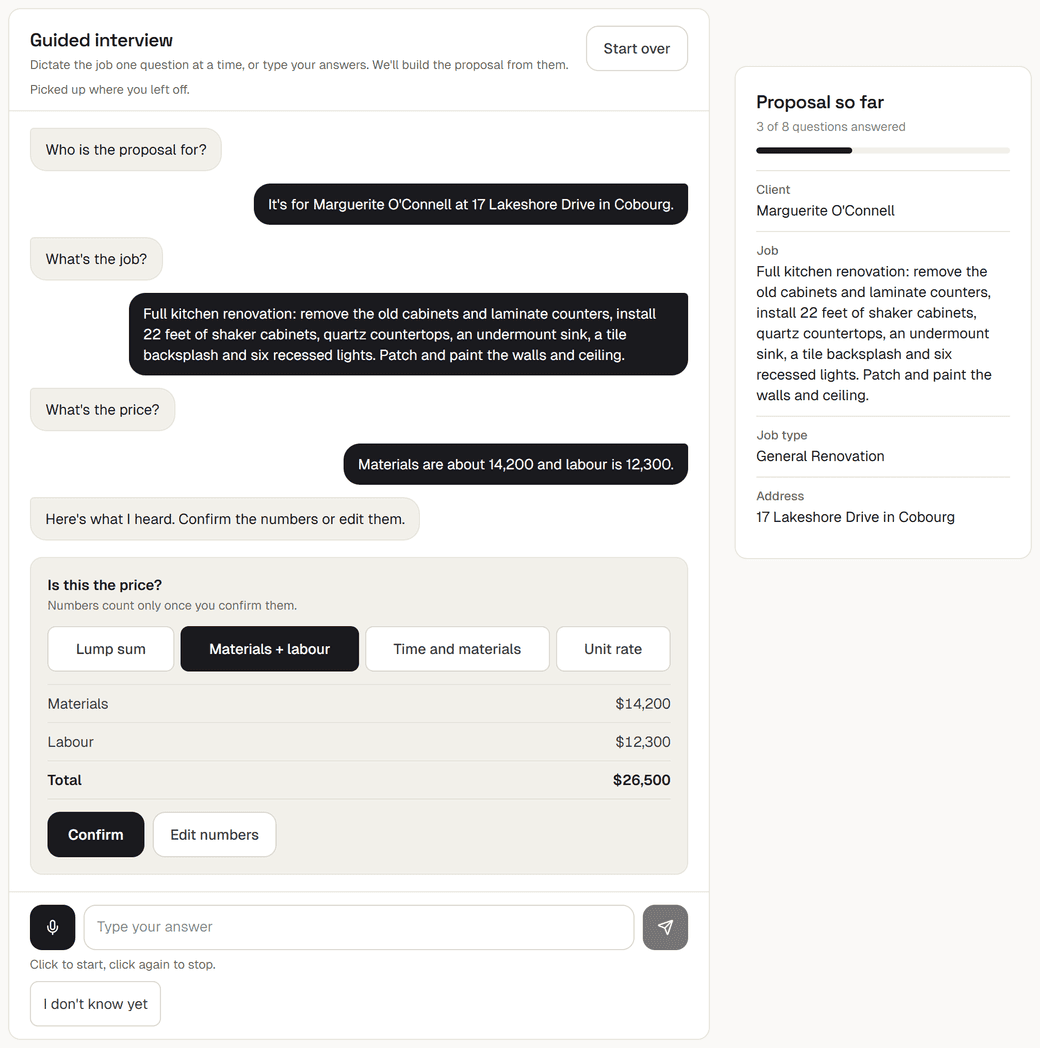
Answer by voice or by typing. The mic is tap to start, tap again to stop (click on a computer), and voice never sends by itself: what was heard lands in the text box so you can fix a misheard name or number before you send it. Optional questions, like the warranty or the job site, have a Skip chip. For the price, the client's name and the payment terms, tap I don't know yet. When you're done you get a summary card, then Generate proposal or Review in the full form.
The honest limits: one spoken answer can run up to 60 seconds, an interview has 5 minutes of voice and 15 turns in total. Your answers are kept for at most 24 hours, and the audio is never stored. The full walkthrough of dictation and the interview is in dictating a proposal from the driveway.
2. Send the proposal before you have the price
A lead calls, wants something in writing today, and you haven't seen the job. You can now write the whole proposal (scope, process, timeline, exclusions, warranty, terms) and leave the number open. In the form, tick I don't have the price yet; in the interview, tap I don't know yet at the price question. The money section then reads "To be confirmed after site visit", and anywhere a total would show, it says "To be confirmed". Never $0.
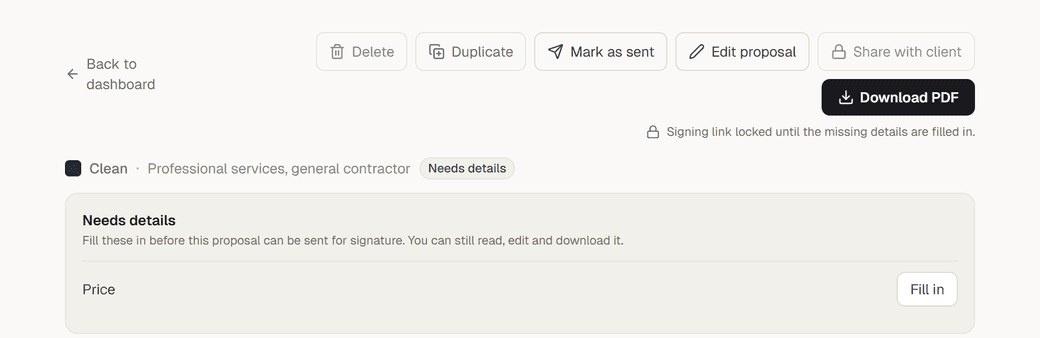
The proposal is marked Needs details, with a Fill inbutton for each missing item. Filling in is instant: the app rewrites that part of the document itself, with no AI call, and it does not use up one of your proposals. The limit, on purpose: until everything is filled in, the proposal can't be shared for signing and the client can't sign it. What to send before the visit, and a short phone script, are in sending a quote before the site visit.
3. Four ways to price a contractor job
Not every job is a materials figure plus a labor figure. The Pricing section of a contractor proposal now offers four choices: Materials + labour, Lump sum (one all-in price, no breakdown), Time and materials and Unit rate. Time and materials takes an hourly rate, an optional materials markup, and, if you want to give the client a ballpark, estimated hours, estimated materials and a not-to-exceed cap. Unit rate takes a rate per unit (square foot, linear foot, window) with an optional estimated quantity and minimum charge.
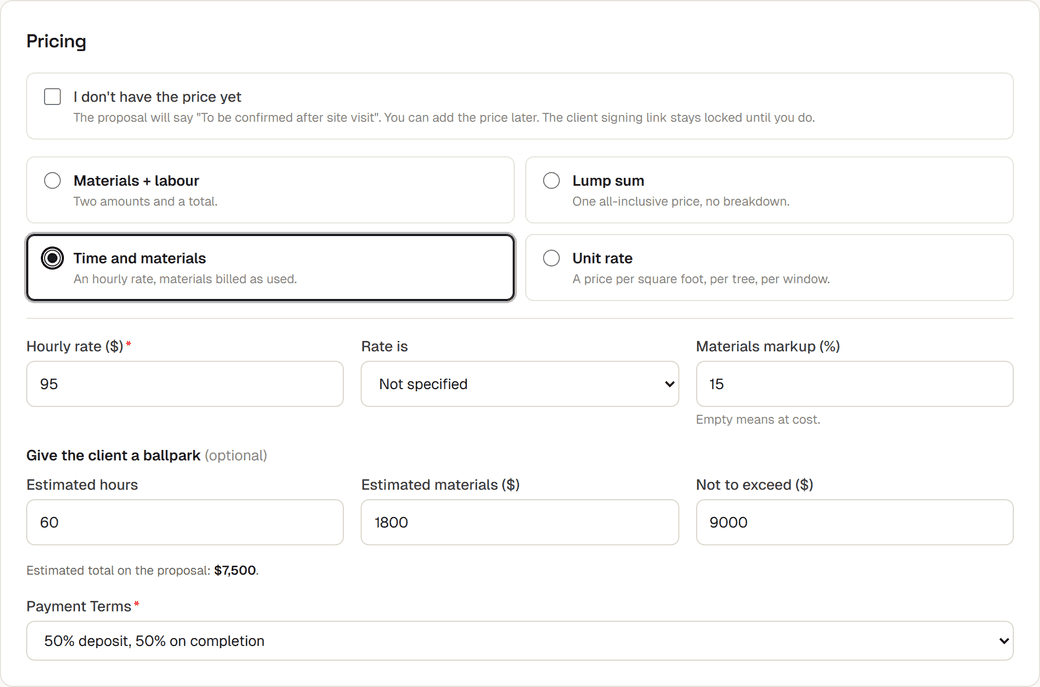
The arithmetic is done in code, not by the AI. Every estimate is labelled as an estimate, and if you give only rates, the proposal shows the rates and no invented total. The limits: it is for contractor proposals only, one rate line per proposal, and while the form and the guided interview both understand rates, Just talk it throughand file import don't yet. What each price section should say, with filled-in examples, is in how to write a time and materials proposal.
What it costs
All three are on every plan, Free included. Interviews, dictations and file imports share one daily limit: 5 interviews, dictations or imports a day on Free, 25 a day on Pro. The free plan gives you 3 proposals a month with a watermarked PDF that you download and send yourself. Share links and online signing are Pro only ($9 a month, with a 7-day free trial), along with unlimited proposals, your logo and all the proposal templates.
Writing the proposal itself takes about a minute, whichever way you start. If you have a job to quote this week, start free and try the interview on it.
Frequently asked questions
What is the guided interview in ProposalPro?
It is a way to start a proposal by answering questions one at a time, such as "Who is the proposal for?" and "What's the price?", by voice or by typing. What the mic heard lands in the text box so you can correct it before sending, and at the end you generate the proposal or review it in the full form. Answers are kept at most 24 hours and audio is never stored.
Can I send a proposal without a price?
Yes. Tick "I don't have the price yet" in the form, or tap "I don't know yet" in the guided interview, and the money section reads "To be confirmed after site visit", never $0. You fill the price in later in one step with no AI call, and until you do, the proposal cannot be shared for signing or signed.
Can ProposalPro do time and materials or unit rate pricing?
Yes, for contractor proposals. You can price by materials and labour, lump sum, time and materials (hourly rate, optional markup, estimated hours and materials, not-to-exceed cap) or unit rate (rate per unit, optional estimated quantity and minimum charge). The app does the arithmetic and labels every estimate as an estimate; one rate line per proposal.
Are these features on the free plan?
Yes. The guided interview, price to be confirmed and all four ways to price are on every plan. Interviews, dictations and file imports share one daily limit: 5 a day on Free, 25 a day on Pro. Share links and online signing are Pro only ($9 a month, 7-day free trial).
Write your next proposal in 2 minutes
ProposalPro generates the whole thing, scope, pricing, and terms, in a template your client can accept online. Free to start.
Start free